Self-Hosted Personal Portfolio
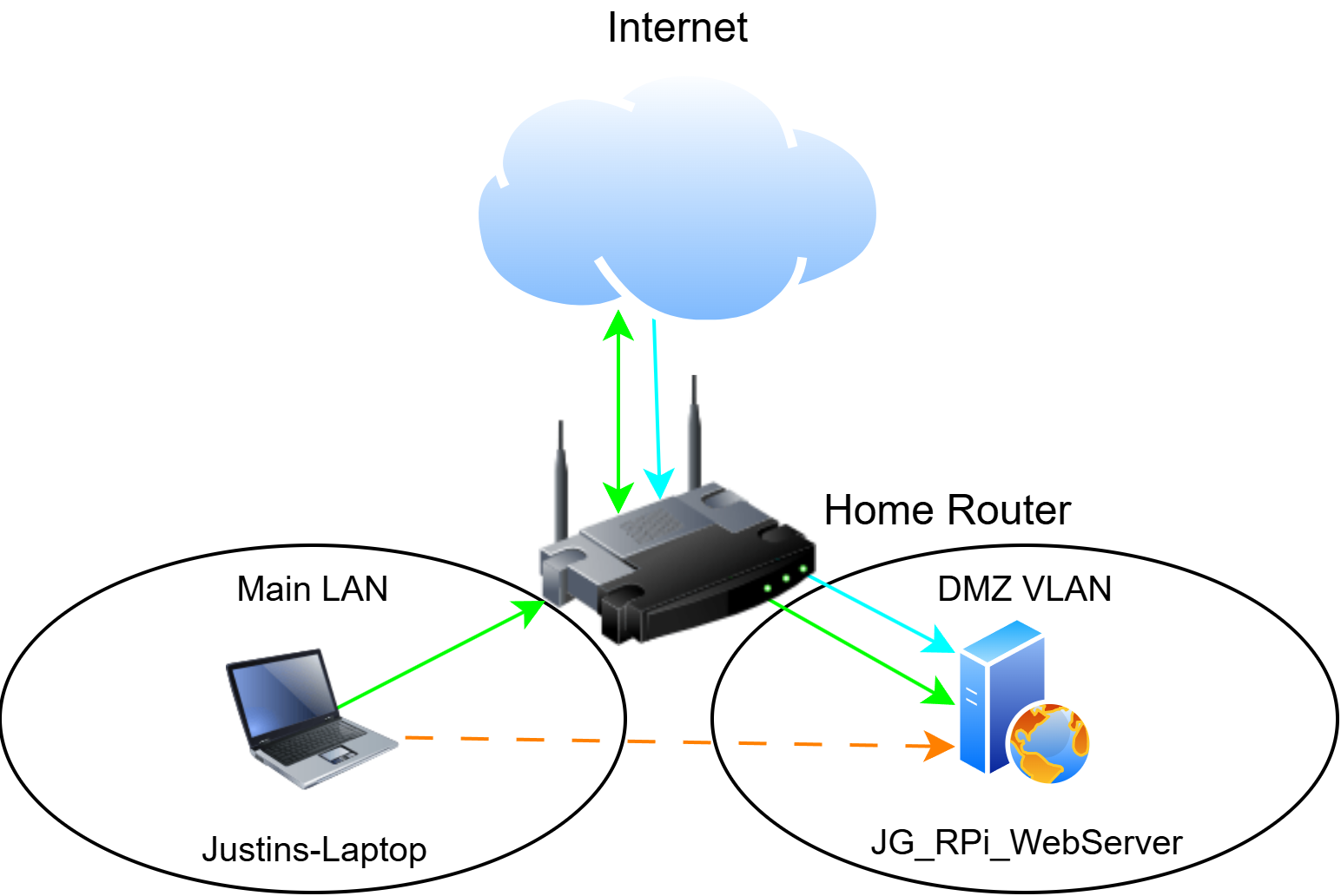
This site - the one you're reading right now - runs on a Raspberry Pi 5 on its own isolated network segment at home, with a custom domain, automatic HTTPS, and a VPN-based management path. The whole host is rebuildable from an Ansible playbook. Live at justingarter.com.
- Reverse Proxy
- DNS & TLS
- VLAN Segmentation
- VPN
- Ansible
Network diagram
Technologies Used
 Raspberry Pi
 Caddy
Caddy WireGuard
| Host | Raspberry Pi 5 · 1 GB RAM · NVMe boot |
|---|---|
| Operating system | Raspberry Pi OS Lite (Debian 13) |
| Web server | Caddy · automatic HTTPS |
| Remote access | WireGuard · sole management path, no LAN-side fallback |
| Firewall | nftables · hand-written · default-deny inbound |
| Network position | Single-homed on a dedicated DMZ VLAN |
| Radios | Wi-Fi and Bluetooth disabled at the firmware layer |
| Cooling | Active cooler · added after thermal testing |
| Edge | Cloudflare proxy · DDNS on a systemd timer |
| Configuration | Ansible · 8 roles · encrypted vault |
| Source | github.com/justin-garter/pi-webserver-ansible |
Overview
This portfolio started on Wix. Self-hosting it gave me a low-stakes place to apply the things I do professionally - network segmentation, hardened remote access, defense-in-depth - to my own network. In August 2026 I rebuilt it onto a smaller Raspberry Pi, and that rebuild turned out to be the more useful half of the project.
What I Built
A static site served by Caddy on a Raspberry Pi 5 with 1GB of memory, booting from NVMe, running Raspberry Pi OS Lite on Debian 13. It sits single-homed on a dedicated DMZ VLAN, with Wi-Fi and Bluetooth disabled at the firmware layer rather than left unconfigured - a dual-homed host bridges the two networks regardless of what the firewall says.
The firewall is a hand-written nftables ruleset, default-deny inbound, and SSH is reachable only over a WireGuard tunnel. That makes the VPN the sole management path with no LAN-side fallback. It is a deliberate trade - I gave up a convenient fallback to take a listening SSH port off the segment entirely, and the cost is real: if the tunnel breaks, recovery is a monitor and a keyboard.
Cloudflare proxies the site, and a DDNS script on a systemd timer keeps DNS current against a dynamic home IP. Caddy is configured to accept client-IP headers only from Cloudflare's ranges, so access logs record real visitors rather than edge addresses and the log-driven blocking acts on the right ones. Further hardening covers automatic security patching, blocking of repeated scanning behaviour, and removal of the provisioning tooling that has no business running on a live host.
What Rebuilding Taught Me
Rebuilding a server from its own documentation is the only reliable way to find out how much of that documentation was true. Not all of it was, which is the entire argument for doing it.
The habit that came out of it is to verify behaviour rather than configuration. A config file describes intent. Querying a running service describes reality. Actually attempting the thing describes truth - and those three answers are not always the same. SSH here is key-only because I tried to log in with a password and confirmed the server refused without even prompting, not because a file says so. Isolation between the DMZ and the trusted LAN is tested from both sides rather than assumed. The Cloudflare trust scoping was confirmed by sending forged client-IP headers from an untrusted host and checking what actually got logged.
Verification log - what was tested, and how
| Claim | How it was checked | Result |
|---|---|---|
| SSH accepts keys only | Attempted a password login against the running host | Pass - refused without prompting |
| DMZ is isolated from the trusted LAN | Reachability tested from both sides, not assumed | Pass |
| Caddy trusts client-IP headers only from Cloudflare | Forged client-IP headers sent from an untrusted host, access logs inspected | Pass |
| Ban enforcement survives a reboot | Forced a ban on a freshly booted host and confirmed the rule appeared in the live ruleset | Pass |
| Playbook reproduces the host exactly | Bare-host rebuild from the playbook alone | Not yet run |
Load testing came out of the same discipline, and it found something no configuration file could have shown. The first benchmark came back around 11 MB/s with suspiciously flat latency - the signature of a saturated link rather than a busy processor. The interface had negotiated 100 Mb/s on a bad patch cable, so the server had been running at roughly 9% of its actual capability. Once replaced, it served 11,669 requests per second at 127 MB/s with the load generator running on the same four cores. That figure is measured over loopback, so it describes what Caddy and the CPU can do rather than what the network path can carry.
Load test - before and after the patch cable was replaced
| Measurement | Before | After |
|---|---|---|
| Link negotiation | 100 Mb/s | 1 Gb/s |
| Throughput | ~11 MB/s | 127 MB/s |
| Requests per second | — | 11,669 |
That test also answered which resource actually binds, and it was not the one I expected. Memory never came close - Caddy peaked at 76MB against the 384MB ceiling I set for it, with swap untouched, which retroactively justifies choosing the 1GB board over something larger. Temperature did bind, at 84.5°C under sustained synthetic load, with the throttle bits set to prove it.
Fitting an active cooler and re-running the test brought the peak to 64.2°C with no throttle bit set at any point, and throughput held. The cooler is not something the real workload needs - a static site behind Cloudflare never approaches that load - but it removes heat as a constraint for anything CPU-heavy this host does later, for the price of a cheap part.
Thermal - before and after the active cooler
| Measurement | Passive | Active cooler |
|---|---|---|
| Idle temperature | 42.8 °C | 34.0 °C |
| Peak under load | 84.5 °C | 64.2 °C |
| Throttling | Triggered | None |
| Requests per second | 11,669 | 11,952 |
The two runs used different concurrency settings, so the request figures confirm that throughput held rather than proving the host got faster. Both are loopback measurements on the host itself.
Resource ceilings under sustained synthetic load
Reproducible Build
The host is codified as an Ansible playbook - eight roles covering the base system, SSH, firewall, VPN, DNS, web server, and monitoring, with secrets in an encrypted vault. It is public at github.com/justin-garter/pi-webserver-ansible. Site content is deliberately not managed there: host configuration and content deploys stay separate changes, so when something breaks there is one variable to check instead of two.
The roles that could lock the box out carry their own guards, and firewall changes are applied behind a timed automatic rollback. I would not call the playbook proven yet - the real test is rebuilding a bare host from it alone and getting an identical result, and I have not done that rebuild.
Outcome
The site is live over HTTPS, the segmentation is verified in both directions, and the whole configuration is in source control. This is a student's project on hardware that costs less than a textbook, not production infrastructure - and the low stakes are the point. It is a place to practise the discipline of verifying instead of assuming, where being wrong costs an afternoon rather than an outage.